Guides & Tutorials
Voice. Delegation. Visuals. In that order.
We’ll walk you through everything: which provider, which tools, the order to follow, the skills you’ll need, and the prompts to use. Plus, we’ll cover the most common mistakes we see coaches and creators making on our platform.
Follow it this weekend and you'll have a system running by Monday that changes how you market your business. We're walking through every piece, every tool, every skill, every prompt. Plus the most common mistakes we watch coaches and creators make on our platform.
One thing upfront: this isn't a hack or a hidden growth formula. It's the underlying architecture top vendors have been quietly building over the past several months. It works because it's simple.
Here's what you'll get:
The mindset shift that decides everything else
The stack: one provider, three tools, one plan
Lever 1: Building skills that sound like you and speak to your audience
Lever 2: Delegating the tasks eating your time
Lever 3: Iterating visuals in minutes instead of weeks
The right order: your 90-day roadmap
The mistakes you don't want to make
1. The Mindset Shift That Decides Everything
Most coaches and creators treat AI like a tool. Like scissors or a hammer. Something you grab when you have a job, then put away when it's done.
That's the wrong category.
AI isn't a tool. It's a layer that sits between you and your work. Permanently. Like an operating system. You don't ask yourself every morning whether to use macOS or Windows. It's just there, in the background, and everything runs on top of it.
The coaches and creators who never make this shift end up making the classic mistake. They ask: "Which AI tool should I buy?" Wrong question. The right question is: "Where in my business is the biggest lever AI can actually pull?"
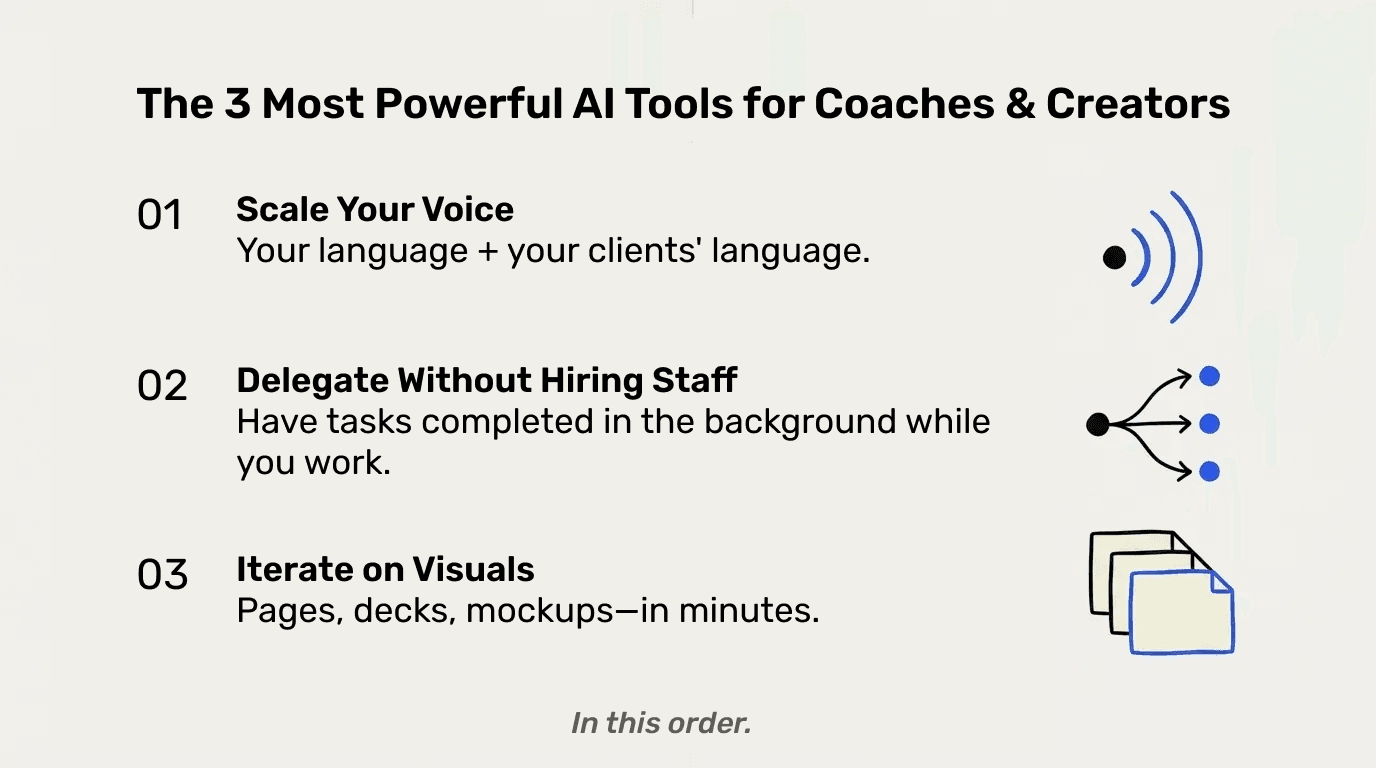
There are three answers. Exactly three. They're the same three from the email, and it's no accident they line up with the parts of your business that carry the most weight as a coach or creator:
Scaling your voice (because your value lives in your methodology and how you communicate it)
Delegating routine tasks (because your time is your second hard limit)
Iterating visuals (because you're constantly building new sales pages, decks, mockups)
Build cleanly in these three areas and you have a real marketing system. Skip them and you'll just keep stacking subscriptions without ROI.
2. The Stack: One Provider, Three Tools, One Plan
We'll keep this short, because this is where most people lose weeks: you need exactly one provider. Claude.
Specifically: the Claude Pro plan, around $20 a month. That's it. It includes three tools that cover all three levers.
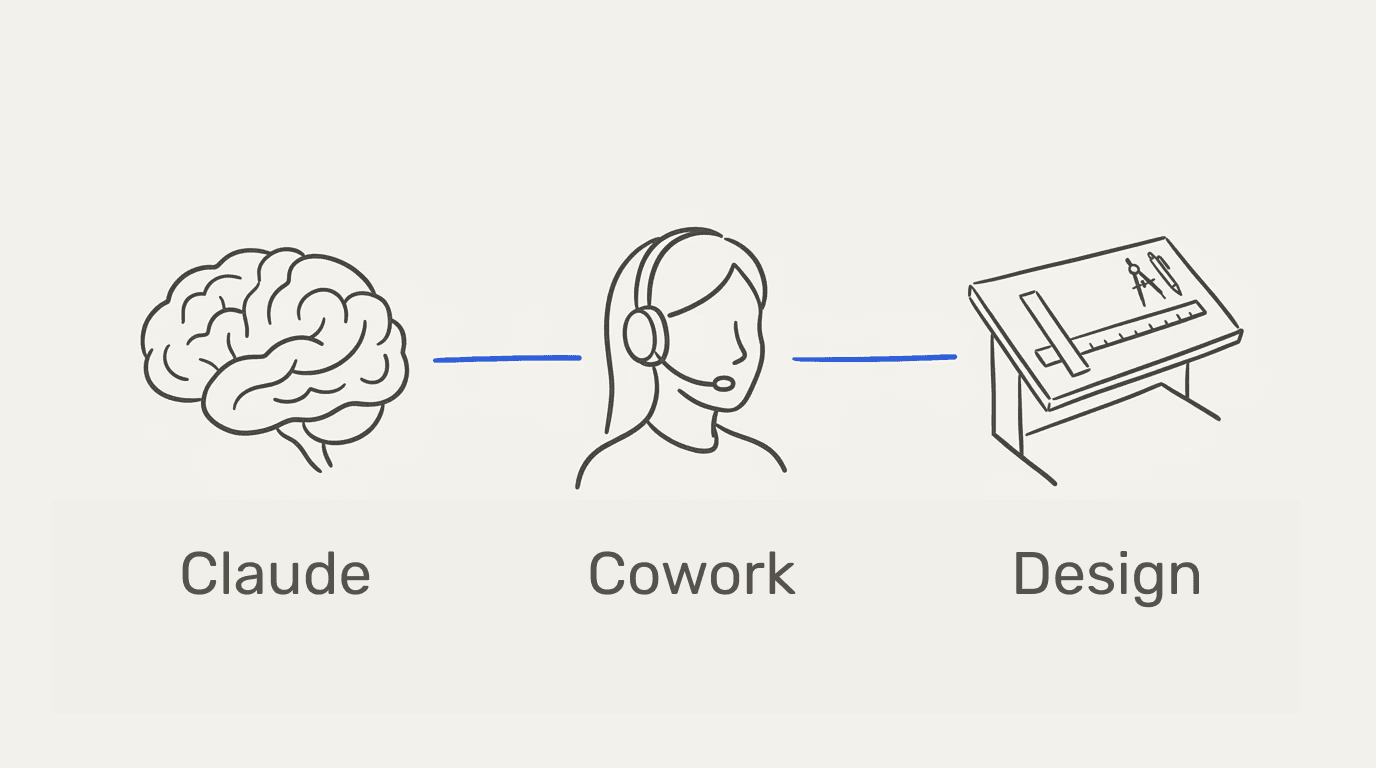
1 - Claude (the chat interface) is where you build skills, give instructions, plan, brainstorm. Your brain.
2 - Claude Cowork is the desktop app that runs as an autonomous agent. You give it tasks. It executes them, with access to your tools (email, Notion, Slack, your browser). Your team member.
3 - Claude Design is the design module. Sales pages, pitch decks, mockups, visuals - from your head straight to finished assets. Your designer.
Cowork and Design are currently included in the Pro plan as research previews, each with their own weekly limits. For most coaches and creators, those limits are enough to do real work.
What We're Deliberately Not Recommending
OpenClaw, Manus, Perplexity Computer. They're all over X and LinkedIn right now. All three are impressive. We use them ourselves. But for you, right now, they're the wrong starting point.
OpenClaw is a fully autonomous agent that runs 24/7 on a cloud computer and decides on tasks proactively. Sounds amazing. It is. But anyone who starts with OpenClaw without a foundation (no clean skills, no clear prompts, no system) ends up with a very expensive chaos generator. You need the three levers running cleanly first. Then, in 3 to 6 months, OpenClaw becomes the natural next step.
Manus and Perplexity Computer are similar agent systems. Same logic: foundation first, premium layer later.
We're also leaving ChatGPT off the recommendation. Not because it's bad, but because Claude is currently better integrated for the three areas that matter here: voice customization through skills, agent functionality in Cowork, and visual generation in Design. If you're coming from ChatGPT, you can port your memories and customizations to Claude in five minutes. You don't lose anything.
3. Lever 1: Skills That Sound Like You and Speak to Your Audience
This is the most important lever. If you only build one of the three, build this one.
A skill is a small knowledge pack you give Claude once. From then on, it uses that knowledge automatically on every request. You don't have to explain who you are, what you sell, or how you write every single time.
The Two Inputs
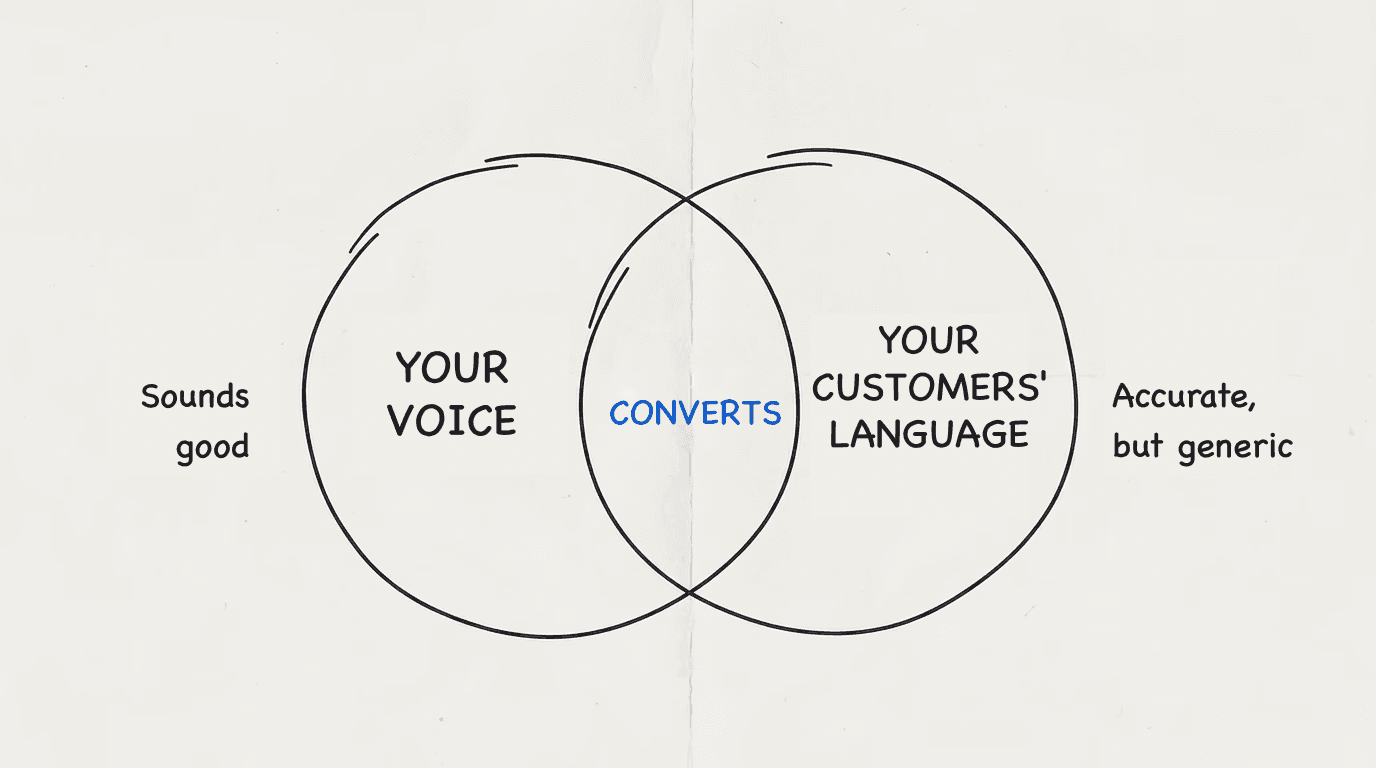
This is where 95% of coaches and creators fail without realizing it. They train their AI on one input. Themselves.
The output sounds like them. But it doesn't convert.
You need two inputs at the same time:
Input 1: Your voice. Your content, your frameworks, your tone. Concretely: your last 50 to 100 posts, your best sales page drafts, a few voice notes where you explain how you actually work.
Input 2: Your audience's language. The exact words they use to describe their problems. Their objections. Their fears. Their goals. This is the output from the six questions in last week's email - the answers from your survey and the patterns from your sales calls.
It's the combination that makes the difference between "sounds good" and "actually converts." AI that writes in your voice but doesn't speak your audience's language produces beautifully written garbage. AI that speaks your audience's language but doesn't sound like you produces generic marketing copy that nobody trusts.
Step by Step: Your First Skill in 15 Minutes
Here's how to build it.
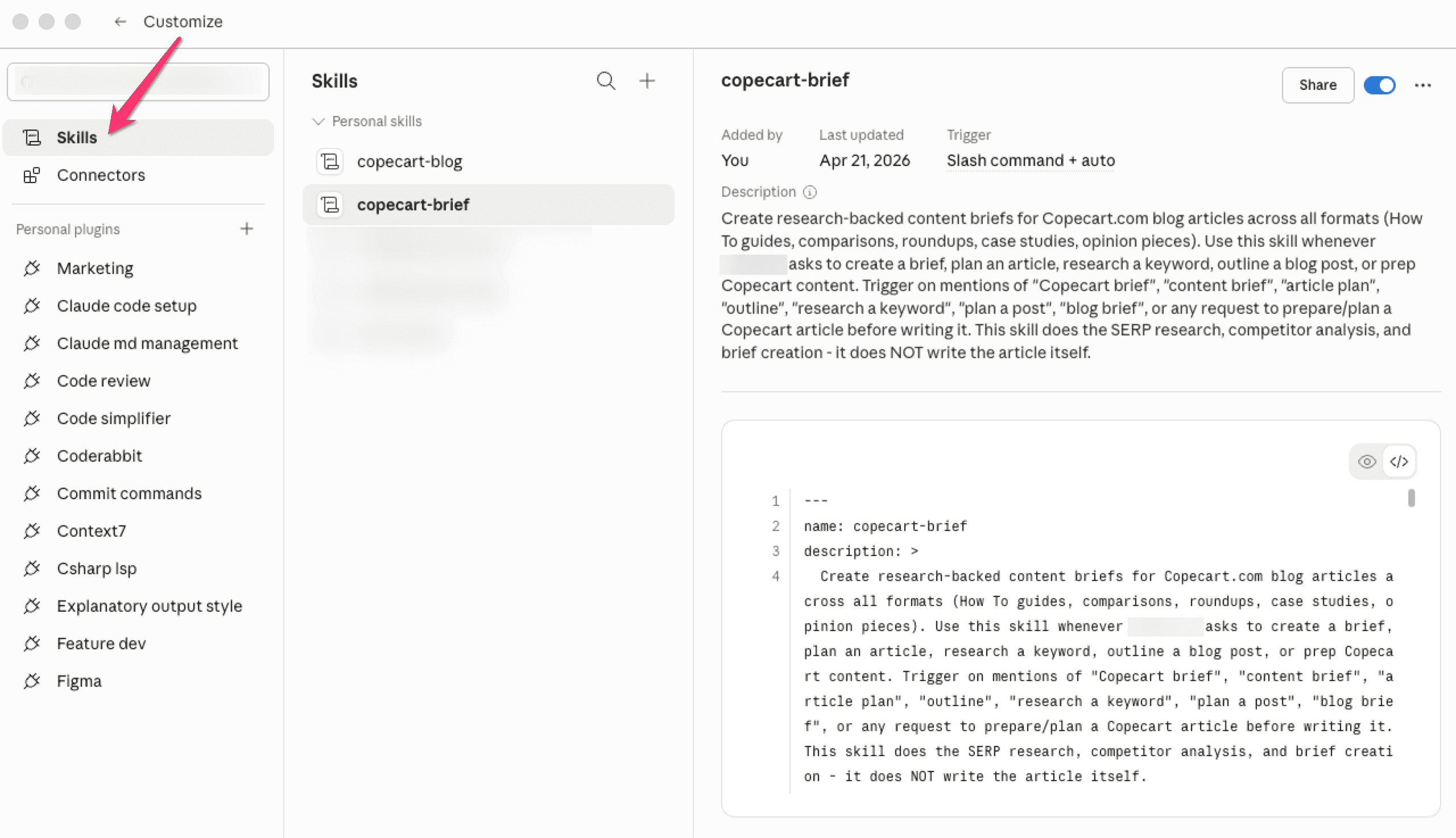
Step 1. Open Claude.ai and go to Skills (Settings → Capabilities → Skills).
Step 2. Create a new skill with a clear name. Example: "[Your Name] Coach Voice" or "[Your Program] Sales Voice."
Step 3. Give it a description in 1-2 sentences explaining when it should activate. Example: "Trigger this skill when writing any marketing content, sales copy, or customer-facing communication for [your program]."
Step 4. Upload your two inputs:
A PDF with your 20-30 best posts, sales page copy, email subject lines, and other marketing texts that best represent your tone
A PDF with the customer-language analysis from last week: top 10 pain points, 5 most common objections, 3 most common goals, all recurring phrases and metaphors
Step 5. Write clear skill instructions about what the AI should and shouldn't do. Example:
Write in the tone and frameworks shown in the uploaded voice samples. Speak the language of the audience defined in the customer-language document. Use the exact words, metaphors, and pain points from the audience. Avoid generic AI marketing language like "leverage," "elevate," "unlock."
Write in short sentences with pauses. Address the reader directly.
Step 6. Activate the skill and test it.
Write a short prompt, like: "Write me the first 3 emails of a 5-email sequence for my new program. Audience: leads who are still on the fence."
The AI should now write in your voice and hit the actual objections of your audience.
When You're Still Rewriting Too Much: Build a Comparison Loop
Your first outputs won't be perfect. That's normal. What most people do at this point is wrong: they rewrite by hand every single time without realizing they're not improving the skill at all.
The faster way: give Claude your version to compare against.
Write one email completely yourself, the way you'd actually send it. Drop it back into the chat with this prompt:
Drop it back into the chat with this prompt:
Here's my own version of the same task. Compare it to the output you just produced. What would you change in the skill so that next time you'd land closer to my version?
Claude will spot the gaps. Maybe your sentences are shorter. Maybe you use specific transitions it never picks. Maybe it misses a pain point your version names directly. You take its suggestions, plug them into the skill, test again.
Three to five comparison rounds, and the skill writes almost like you.
This loop is the real lever behind the lever. You're not training the AI through instructions, you're training it through comparison. Same way you'd onboard a new team member: not with a manual, but by showing them your best examples.
Use Cases for Coaches and Creators
What you'll use this skill for from now on:
Email sequences for new programs or product launches
Sales page drafts in your voice
Social media captions that actually sound like you
Webinar scripts and workshop outlines
Replies to discovery calls and lead inquiries
Newsletter themes pulled from your last calls
Before: you had a choice between "I write it myself and it takes forever" or "AI writes it and I rewrite it from scratch anyway."
With the skill: you record a voice note or type a quick brief in a minute. Output is 80-90% there. You tweak briefly and send.
4. Lever 2: Delegating Tasks Without Hiring
Der erste Hebel hat dein Schreiben skaliert. Der zweite skaliert deine Zeit.
The first lever scaled your writing. The second one scales your time.
Cowork is a desktop app you download to your Mac or PC after signing up for the Pro plan. Launch it, switch to the Cowork tab, and from that moment you have an autonomous agent that can work with your tools.
It can read and reply to emails, update Notion databases, send Slack messages, visit and analyze websites, propose Calendly bookings, and a lot more. You give it tasks. It executes them.
Activate Connectors. Carefully.
Before you dive in, one safety rule that'll save you weeks of stress: don't give your agent full access to everything on day one.
In Cowork settings there's a list of connectors. Gmail, Google Drive, Notion, Slack, Asana, Shopify, and many more. You toggle them on and off, and for each one you decide whether the AI can only read, or also edit and delete.
Our recommendation for the first two weeks: read-only access. Let the AI scan your inbox, search Notion, check your calendar. No writing, editing, or deleting yet.
After two weeks, if the AI is producing clean outputs, give it edit access for drafts. It writes drafts, you send them. Another week later, full access.
This is the same logic you'd use onboarding a new hire. You don't hand them your bank account on day one. Treat your AI the same way.
Step by Step: Your First Cron Job
A cron job is a task that runs automatically at a set time. Every weekday at 7 AM. Every Monday at 9 AM. You don't have to think about it.
Here's the first one to build: your Daily Marketing Brief.
Step 1. In Cowork: new cron job, schedule "every weekday at 7:00 AM."
Step 2. Task description:
Read my inbox since last night. Filter for discovery requests, coaching inquiries, affiliate inquiries. Send me a summary with:
1) How many new requests
2) A score per request against my ICP (defined in the Notion doc [link])
3) Three reply drafts in my voice (use [Skill Name] from Lever 1) for the top 3 requests
4) With each draft, propose three Calendly slots from my calendar
Send everything as a compact Slack message in the channel #morning-brief at 7:30 AM.
Step 3. Activate.
Tomorrow morning, you wake up to your most important inquiries already pre-filtered. Reply drafts waiting for one click. Calendly slots proposed. You spend 5-10 minutes on what used to take an hour.
Use Cases for Coaches and Creators
Tasks we see coaches and creators on our platform actively automating:
Lead qualification: AI scores inquiries against your ICP, sends qualified leads automatic Calendly links, archives non-fits with a polite reply
Content distribution: A blog post automatically becomes a LinkedIn post, a tweet thread, and a newsletter blurb. All in your voice (using the skill from Lever 1)
Sales call prep: Before every call, a 1-pager waiting with everything relevant. LinkedIn profile, prior email history, CRM notes
Customer support FAQ: Recurring questions get answered automatically as drafts you approve. Complex ones flagged for your attention
Onboarding sequences: New buyers get personalized first 3 onboarding emails based on which program they bought
If you're already a coach or creator using our platform: every sale runs through our checkout, and the data lands in your vendor dashboard. Cowork can read that data stream and summarize for you each morning what happened overnight. Which products sold, which affiliates were active, where conversion moved up or down.
5. Lever 3: Iterating Visuals in Minutes Instead of Weeks
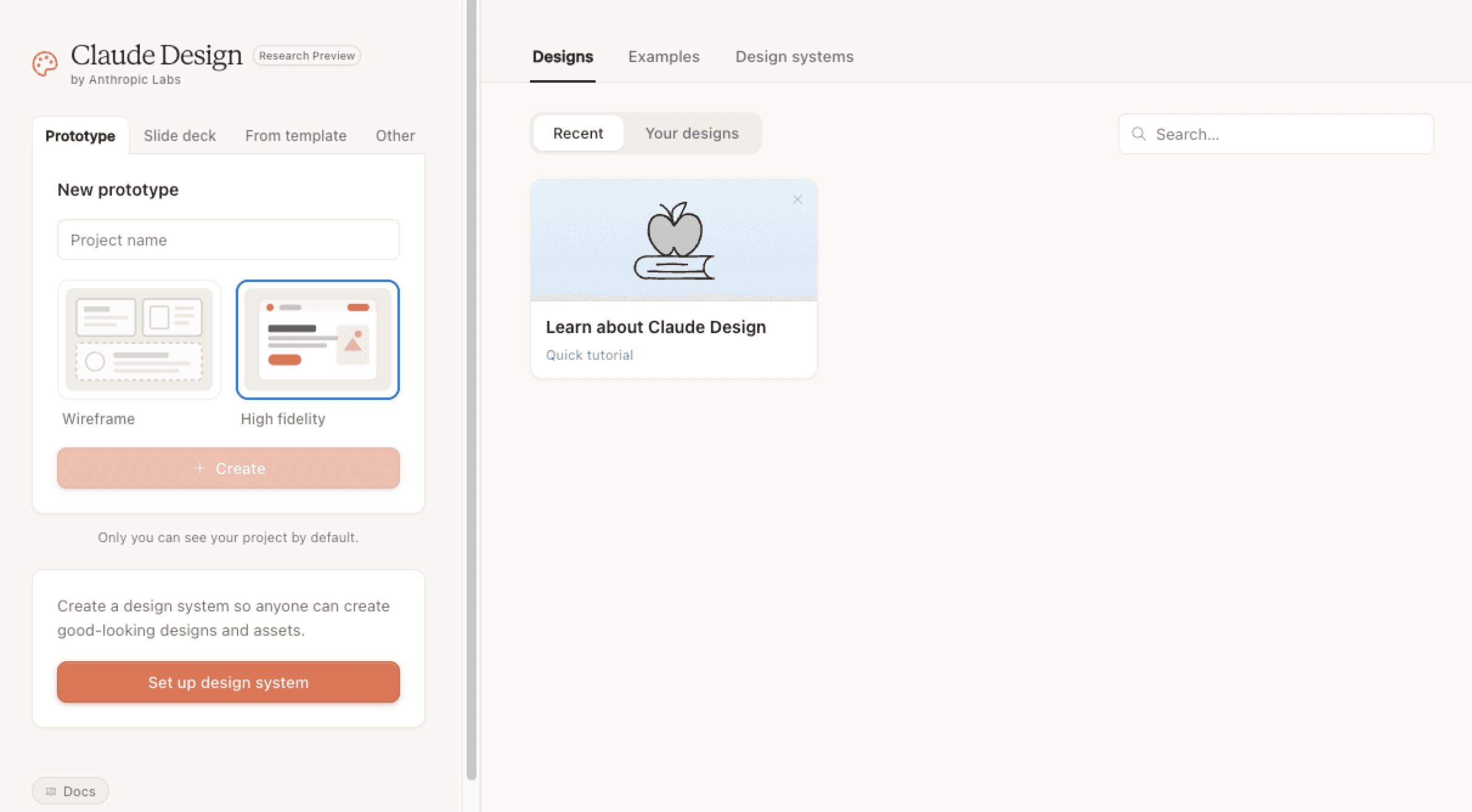
The third lever is your visual output. Sales pages, pitch decks, mockups, webinar slides, onboarding visuals. Everything coaches and creators used to need a designer and three weeks to produce.
Claude Design is a separate module inside Claude. You describe what you need, Claude builds the first version. You tweak through clicks and inline comments until it lands.
Set Up Your Brand System Once. Use It Forever.
Before you build your first visual, do the setup step most people skip: your brand system.
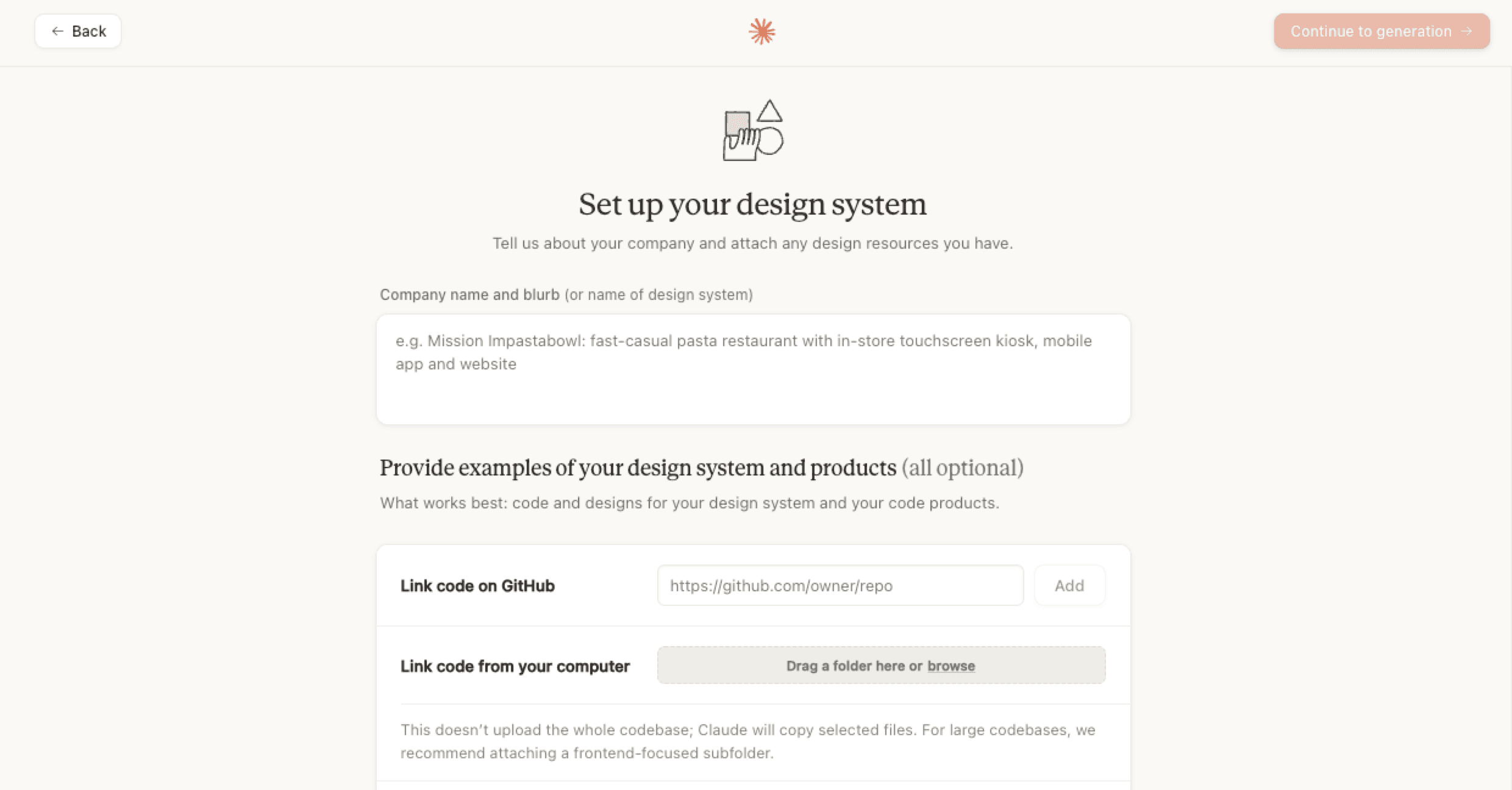
In Claude Design, you define once:
Your brand colors (hex codes)
Your fonts
Your logo
The style you want (minimalist, magazine editorial, bold, soft, whatever fits)
Don't have a polished brand guide yet? Not a problem. Take screenshots of your website, your logo, your favorite posts.
Upload them and tell Claude:
"Build me a consistent brand system from these inputs."
Claude returns a PDF with colors, fonts, and style notes you'll use for every visual from then on.
You do this setup step exactly once. 10 to 15 minutes.
From then on, every visual you create in Claude Design automatically looks like you. Consistent. Not generic.
Step by Step: Your First Sales Page
Here's how it actually works.
Step 1. Open Claude Design (claude.ai/design).
Step 2. Type into the chat:
Build me a sales page for my new 8-week coaching program "[Program name]". Audience: [ICP]. Main problem it solves: [Problem]. Format: long-form, scrollable, with a clear CTA button to checkout. Sections: hero with hook, pain-point section, the program in detail, 3 testimonials, FAQ, final CTA. Use my brand system.
Step 3. Wait 5-10 minutes. Claude builds the entire page.
Step 4. Iterate. Click on individual sections and give feedback right inside the interface. "This headline is too long." "Cut this section entirely." "Two columns for these bullet points." "Different color for the CTA."
Every comment gets implemented in real time. You see the change immediately.
Step 5. Once the page lands, export. Claude Design exports as HTML, PDF, PPTX, or directly to Canva.
What used to take a designer plus three weeks of iteration, you now have in 30 to 60 minutes.
Use Cases for Coaches and Creators
Sales pages: New programs get their own pages in an hour instead of a week
Pitch decks for affiliates: Pitching your program to potential affiliates? Each one gets a customized deck
Webinar slides: Complete decks for 60-minute webinars in 45 minutes
Onboarding visuals: Mockups in your onboarding emails make them look more professional and reduce refund requests
Lead magnets: Workbooks, PDFs, checklists, roadmaps. All in your branding
A/B testing also becomes realistic. You build three versions of a sales page in an hour and actually test what converts. Before, you ran one version because more wasn't possible.
6. The Right Order: Your 90-Day Roadmap
These three levers only work in this order. Here's how to build them cleanly.
Day 1-30: Lever 1 (Voice)
The first 30 days belong entirely to your voice skill.
Day 1-7: Gather data. Send out the customer-language survey from last week. Transcribe and analyze your last 20 sales calls. Pack your 30 best marketing pieces into one PDF.
Day 8-14: Build, test, iterate the skill. You'll need 2-3 versions before it lands. That's normal.
Day 15-30: Use the skill daily. Every email, every post, every newsletter goes through it. You'll spot gaps and patch them.
Day 31-60: Lever 2 (Cowork and Cron Jobs)
With the voice skill as your foundation, Cowork comes next.
Day 31-37: Install Cowork, activate connectors (read-only first), give it manual tasks to learn how the agent responds to your style.
Day 38-50: First cron jobs. Start with the Daily Marketing Brief. Once that's running, build the next: lead qualification, content distribution, sales call prep.
Day 51-60: Unlock full access for the connectors that ran cleanly. Drafts become autonomous actions. Your agent works 24/7.
Day 61-90: Lever 3 (Visuals)
Now Claude Design comes in.
Why now and not earlier? Because you now have a clear voice and an autonomous agent. Visuals without voice produce AI slop that looks pretty but doesn't convert. Visuals with voice and a system behind them become real conversion assets.
Day 61-67: Set up your brand system. Run three test visuals to learn how Claude Design responds.
Day 68-80: Rebuild your most important marketing assets. Your top 3 sales pages, your onboarding deck, your webinar slides.
Day 81-90: Build an A/B testing loop. Multiple versions per asset. Claude Design produces them in the time it used to take to ship one.
After 90 days, you have a marketing system running that gives you time back every day and produces better outputs than anything you used to make manually.
7. The Most Common AI Setup Mistakes
These are the mistakes we see most often with coaches and creators on our platform. Knowing them saves you weeks.
Mistake 1: Visuals First
Most common mistake by far. You see Claude Design, get excited, build three pitch decks, five mockups, two sales pages.
But none of them convert. Because they don't carry your voice and don't speak your audience's language.
Fix: voice skill first, visuals later.
Mistake 2: Too Many Skills
Once your first skill works, you want more. A skill for every use case. Sales skill, email skill, newsletter skill, webinar skill, affiliate skill.
Wrong move. Past 15-20 active skills, Claude becomes unreliable. It picks the wrong skill for the wrong task.
Fix: sweet spot is 5-10 sharply built skills. Better fewer sharp skills than many fuzzy ones.
Mistake 3: Tool-First Instead of Problem-First
"Ich habe gehört, dass [Tool X] cool ist. Lass mich das mal testen."
"I heard [Tool X] is cool. Let me try it."
That's not how you build leverage. That's how you collect subscriptions.
Fix: every tool decision starts with the question, "what problem am I solving right now?" Then one tool that solves exactly that problem. Not two. Not three.
Mistake 4: Full Access on Day One
Some coaches and creators give their AI agent full access to everything on day one. Email, Drive, Notion, Stripe.
What happens: AI makes mistakes in the first weeks. It deletes files, sends drafts that shouldn't have gone out, categorizes important emails as spam.
Fix: progressive trust. Read-only first. Edit drafts after 1-2 weeks. Full access after 4 weeks once trust is built.
Mistake 5: Jumping Straight to OpenClaw or Manus
Said it above, worth saying again. These agent systems are impressive but they're not your starting point. Anyone who starts with OpenClaw without a foundation builds expensive chaos.
Fix: get the three levers running cleanly first. Then, in 3-6 months, evaluate whether OpenClaw is the next step.
Mistake 6: Generic Voice Inputs
You build the voice skill and upload your last 50 posts. But most of them are generic marketing posts you don't even like yourself.
Output: AI sounds like generic marketing.
Fix: only upload texts that show your BEST voice. Better 10 great posts than 100 mediocre ones.
Pulling the Lever
The three levers (voice, delegation, visuals) are the setup we see at the smartest coaches and creators on our platform. It's not the only setup that works. But it's the one that delivers the highest output for the lowest effort.
What you have now: the complete playbook you can follow this weekend.
One last thing. AI will build you a better marketing system. But that marketing system has to actually sell at the end of the funnel. At CopeCart we're the platform that handles that final step cleanly. From the click on the checkout button to the payout in your account. Course sales, subscriptions, digital products, affiliate programs. All in one setup, no monthly fees. We only earn when you sell.
Create a free CopeCart account and close your marketing lever with a checkout that doesn't get in the way.
FAQ
Do I need both inputs for the voice skill, or is my own voice enough?
Both. AI that only writes in your voice will sound like you, but it won't hit the pain points and language of your audience. The combination is what converts.
How long does it really take to get the setup running?
A weekend is enough to get the foundation of all three levers running. Cleanly calibrated, they take 90 days. The full output kicks in around 6 months once your skills, cron jobs, and visual workflows are dialed in.
Can I build this setup with ChatGPT instead of Claude?
You can, but we don't recommend it. Claude Skills, Cowork, and Design are currently more deeply integrated than the ChatGPT equivalents. If you're coming from ChatGPT, you can port your memories and customizations to Claude in five minutes.
What happens after 90 days? Does OpenClaw come into play?
Possibly. OpenClaw is the next level for coaches and creators who already have a clear workflow and want to execute tasks fully autonomously. If your three levers are running cleanly and you notice you need another layer of autonomous action, we'll cover that in a future playbook.
What does the setup actually cost?
Claude Pro plan: around $20 a month. That's it. Cowork and Design are included as research previews in the Pro plan. With heavy use you can upgrade to the Max plan, but for most coaches and creators, the Pro limits are enough.
What if I'm not technical?
None of the steps in this playbook require technical know-how. That's the point. If you can write an email, you can build a skill. If you can use Slack, you can run Cowork. If you've ever used Canva, you can use Claude Design.